ActBook App logo

A guided tour

Watch one gig go from tap to paid.

Here's the whole loop, in the order you'll actually live it — a client taps your booking link, and ActBook carries it all the way to a signed contract, money in your account, and the next gig after that. Ten stops, about three minutes.

14 days free. No credit card required.

1 Your booking link

One link your clients tap to book you.

No more eleven-email back-and-forth. Drop your link on your website, your socials, or in a reply, and clients do the work: they pick a date, choose which show they want, and hand you the details — venue, times, headcount — in one go.

  • Clients pick from your acts — each with its own length and price
  • One date or several — a single show or a whole run, in one booking
  • Every request lands straight in your schedule, acknowledged instantly
  • Not ready to book? Embed a contact form too — one line of code, and every inquiry lands in ActBook as a lead
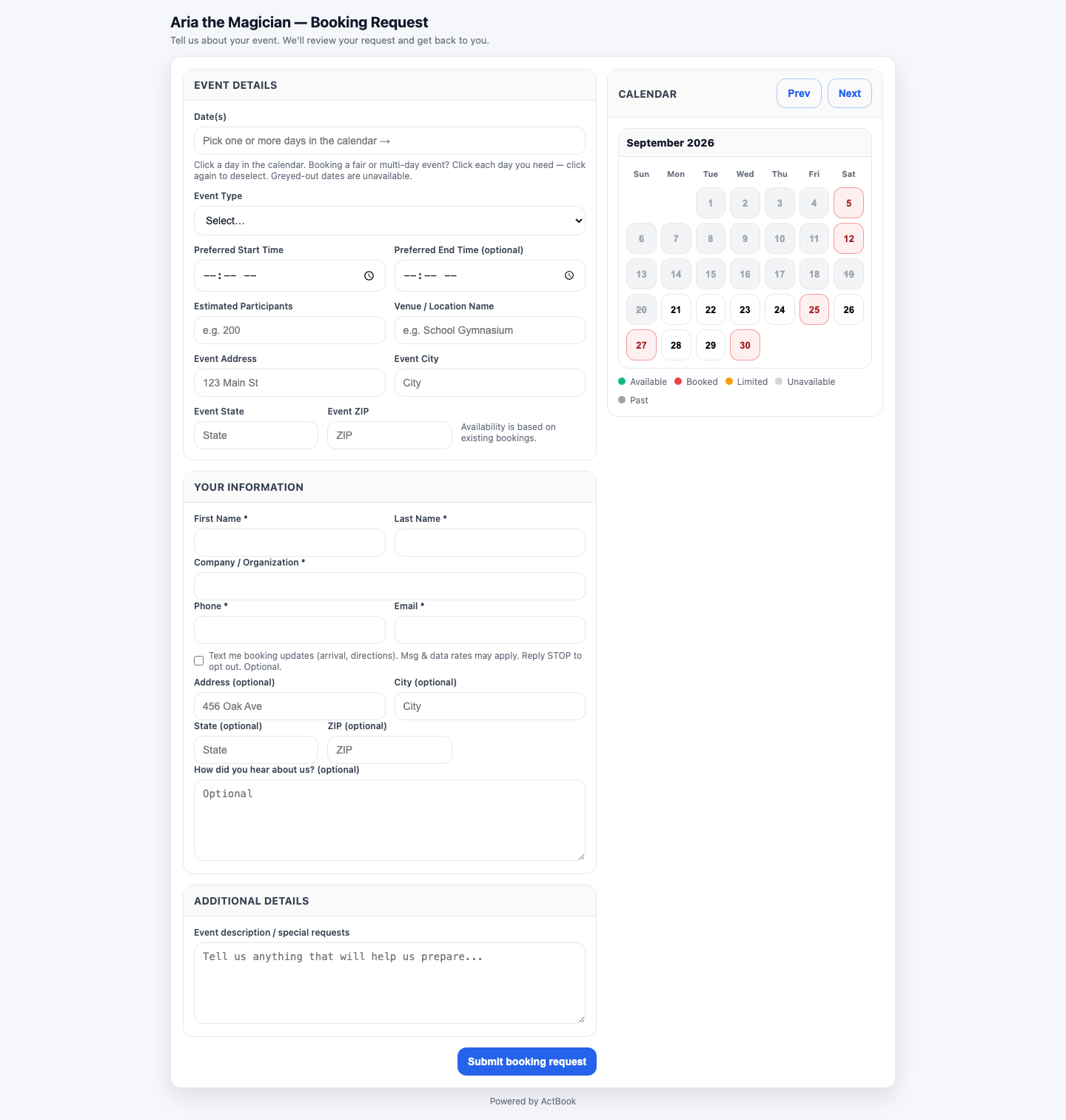
actbook.app/book
The public self-booking form a client uses to request a date

2 Availability & buffers

It only ever offers times you can actually do.

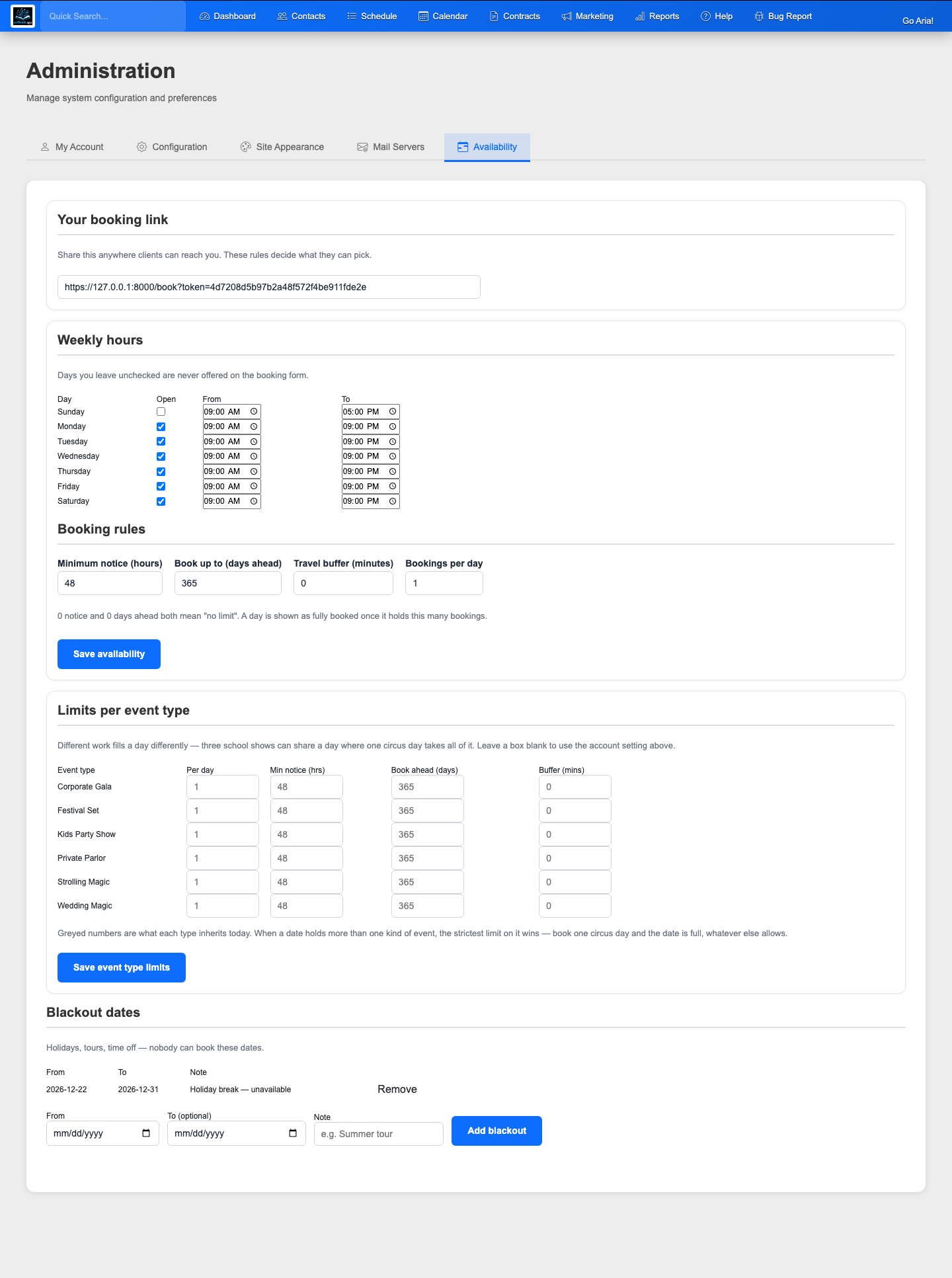
Set your working hours, how much notice you need, travel buffers between gigs, a cap on bookings per day, and blackout dates for holidays or tours. Your booking link obeys every rule — so you never get double-booked or an impossible turnaround again.

  • Travel time baked in between back-to-back gigs
  • Blackout dates for vacations, tours, and days off
  • Minimum notice and a daily cap so you stay sane
actbook.app/availability
Availability settings: working hours, buffers, and blackout dates

3 Your calendar

Every request becomes a gig on your calendar.

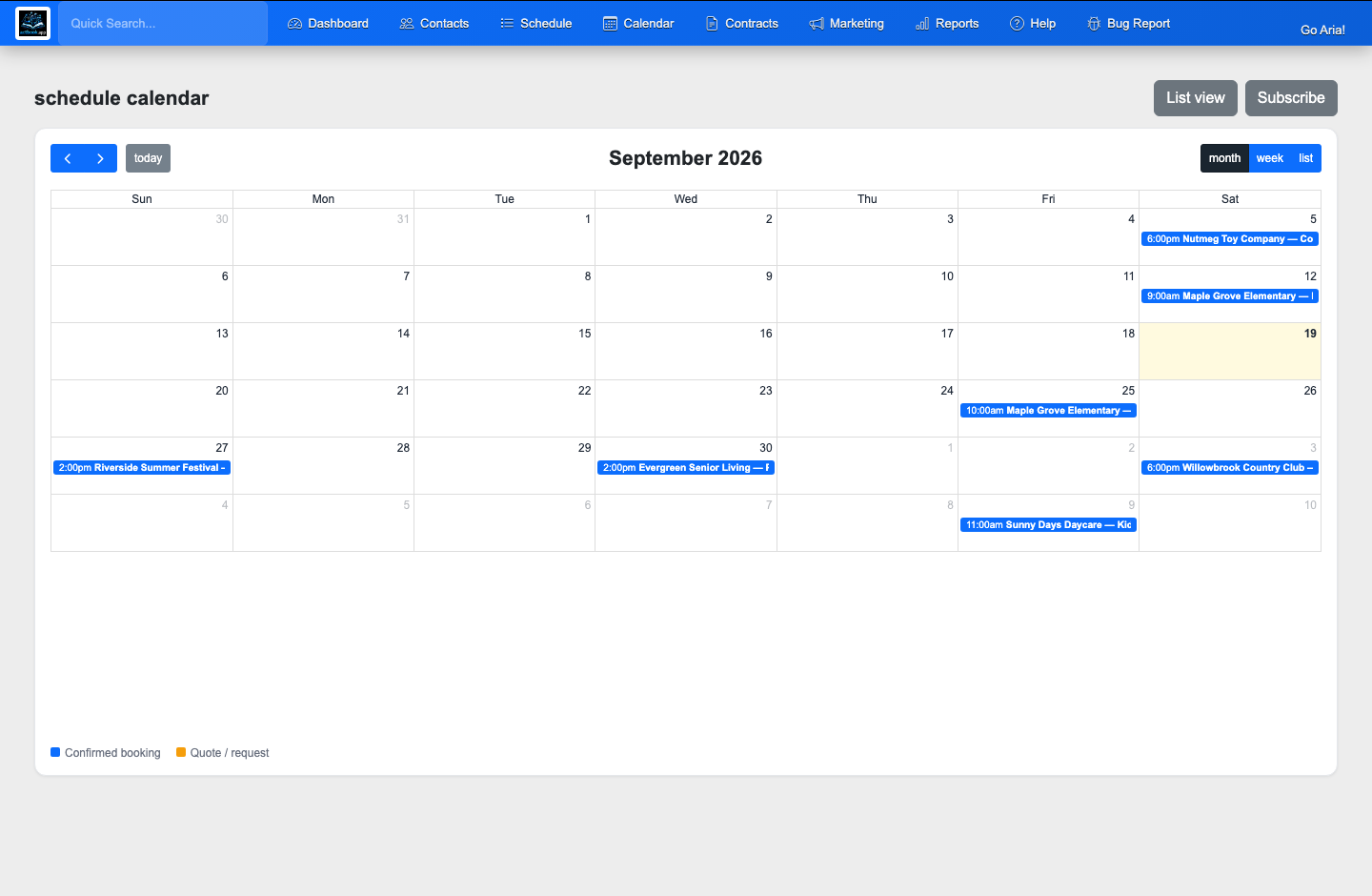
Confirmed gigs and pending quotes show up in month, week, and day views, color-coded so you can read your whole season at a glance. Subscribe to the feed once and it all syncs into Google Calendar or Apple Calendar automatically.

  • Month, week, and list views
  • Quotes and confirmed gigs, color-coded
  • Subscribe from Google Calendar or Apple Calendar
actbook.app/calendar
The calendar showing confirmed gigs and pending quotes across the month

4 Client details

A little black book that never forgets.

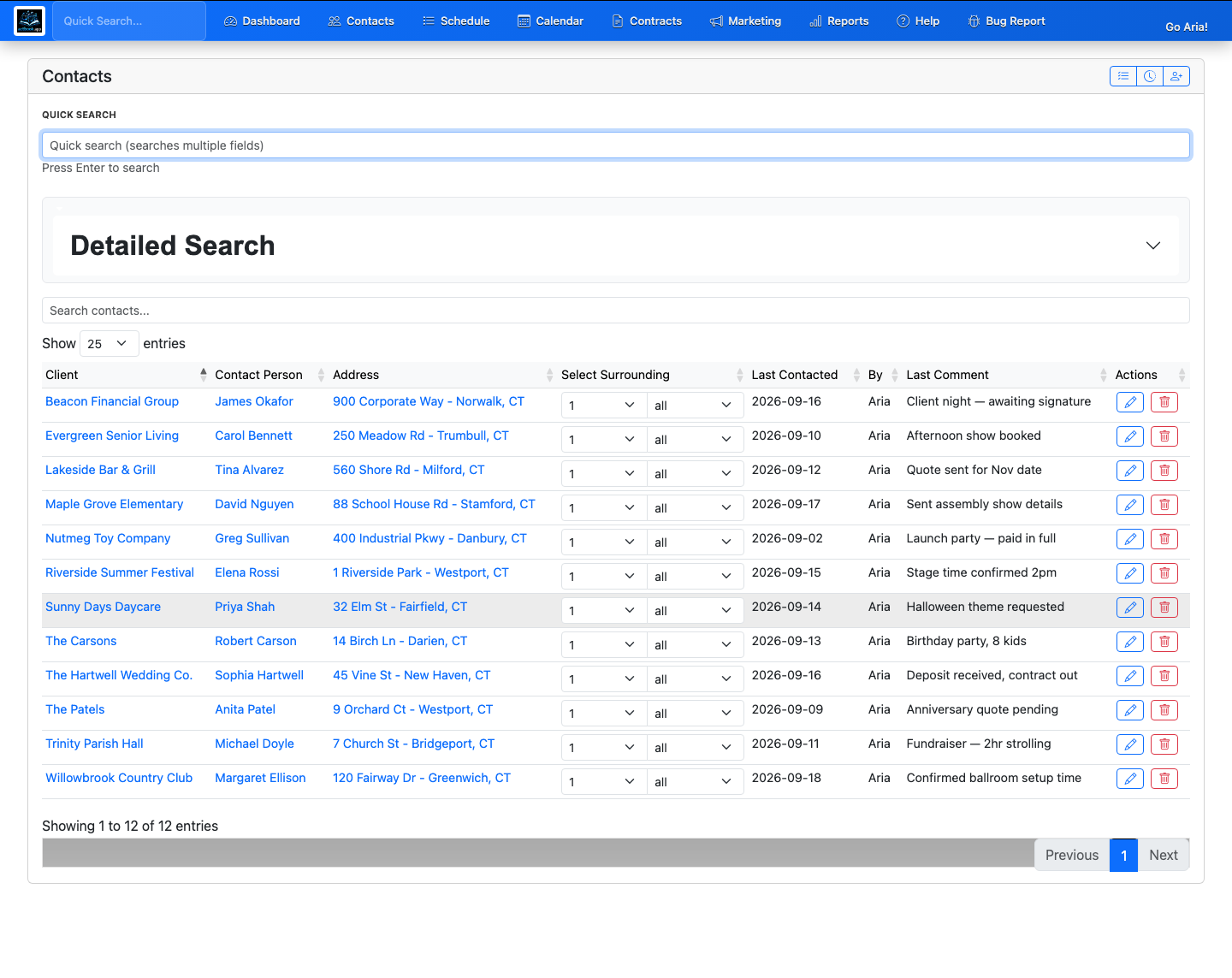
Every client, venue, and note is saved the moment they book. When that school or wedding planner comes back next year, their details are already there — repeat bookings are a couple of clicks, not a fresh interrogation.

  • Contacts, venues, and notes in one place
  • Full history for every client you've worked with
  • Tag and segment for follow-ups and mailings
actbook.app/contacts
The contacts list: past and current clients, venues, and booking history

5 Contract & e-signature

Send a real contract. They sign it online.

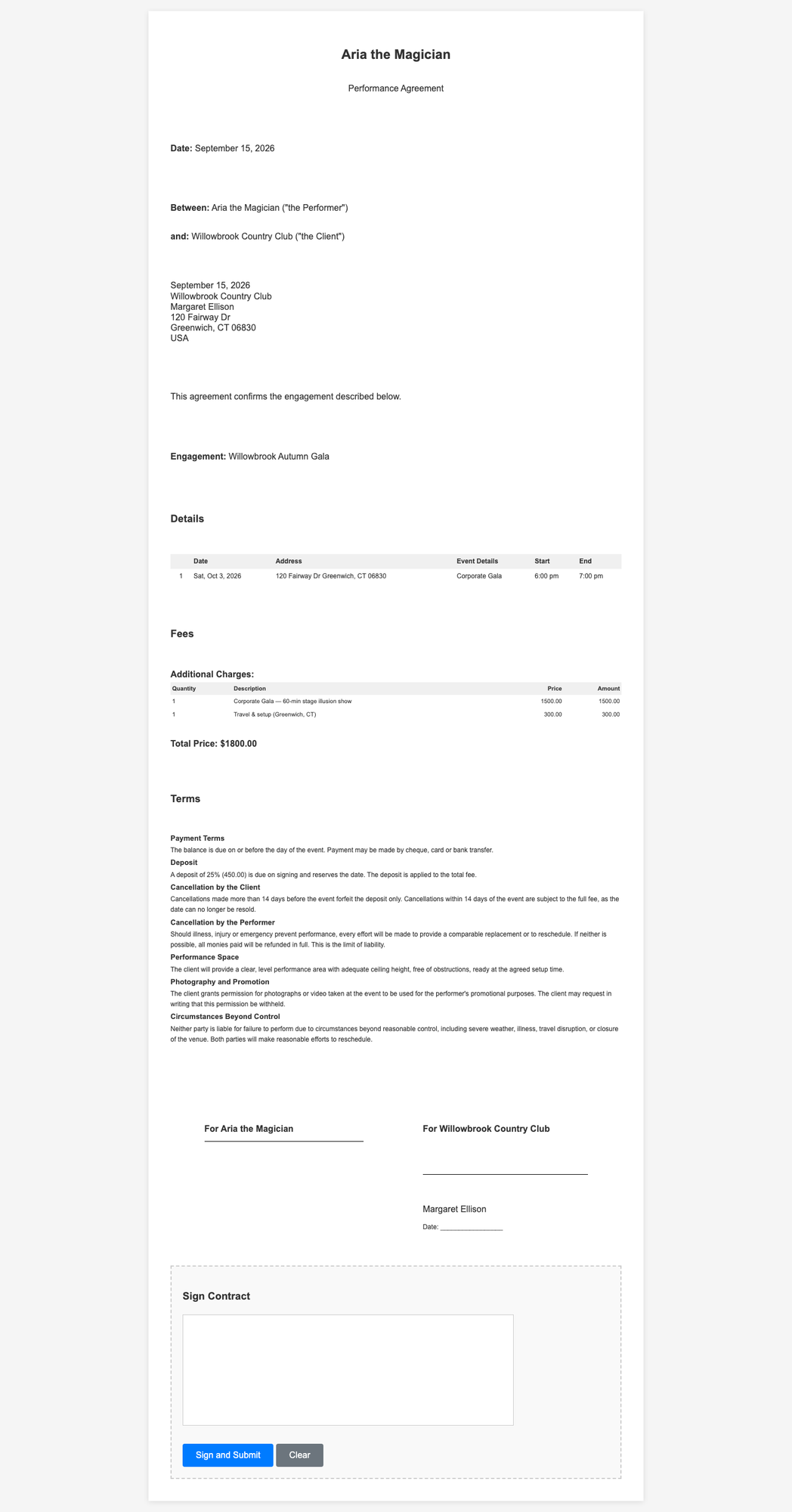
Build a contract from your own template and clauses — deposit terms, cancellation policy, the lot. Your client opens a private link, reads it, and signs right in the browser. No printing, no scanning, no "I'll mail it back to you."

  • Guided setup builds the contract for your kind of work
  • Clients sign in the browser — a signed PDF is stored
  • Your terms and deposit policy travel with every booking
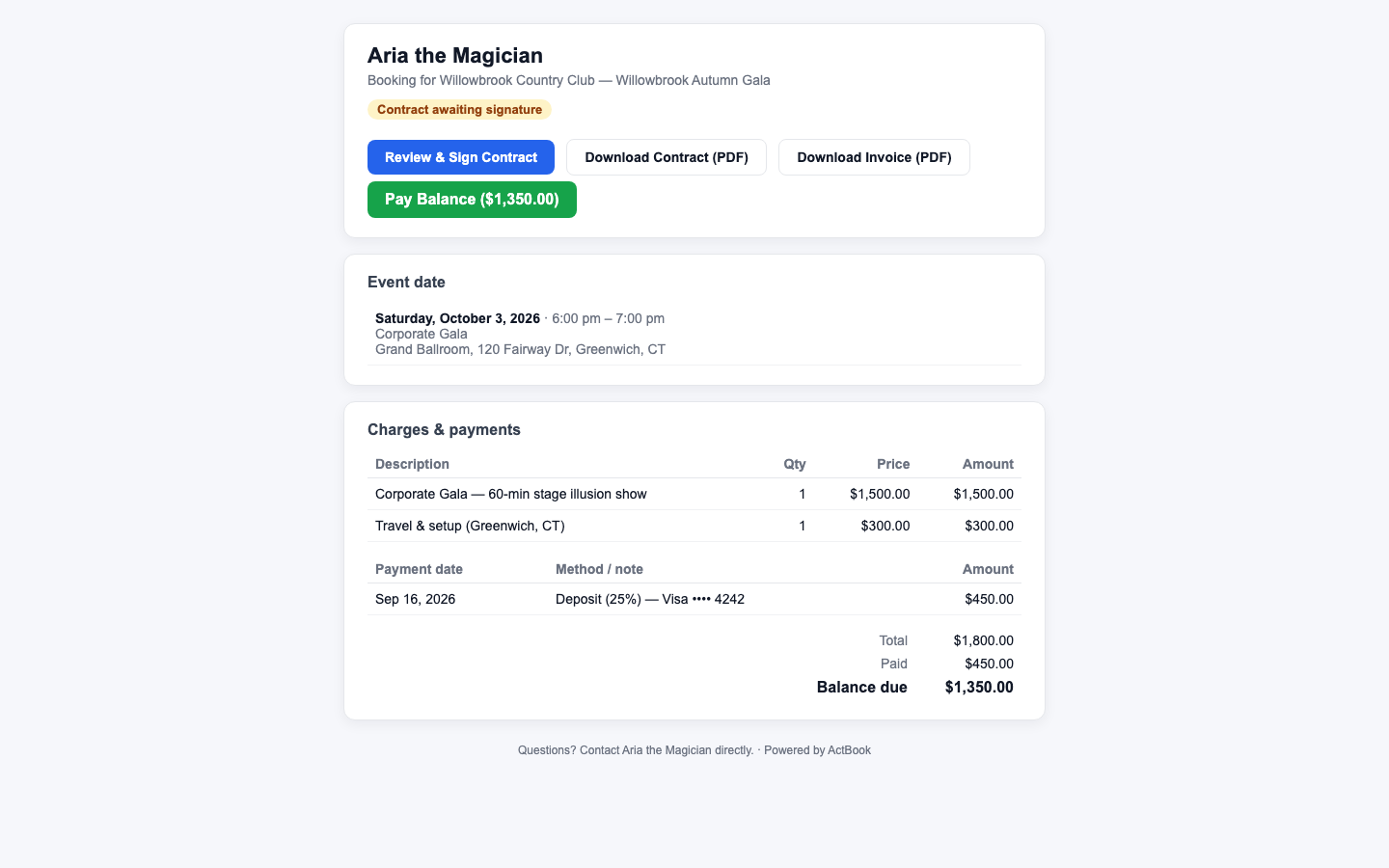
actbook.app/portal
The client portal where a customer reviews and signs the contract

6 Invoice & payment

Invoice from the same booking. Get paid by card.

The invoice builds itself from the gig you already entered — no re-keying. Your client pays their deposit or balance by card from the same portal, and the payment lands against the booking automatically.

  • Invoice generated from the booking's line items
  • Clients pay deposit or balance by card
  • Balance updates itself as payments come in
actbook.app/portal
The invoice and pay-by-card section of the client portal

7 Automations

The part that books next year while you sleep.

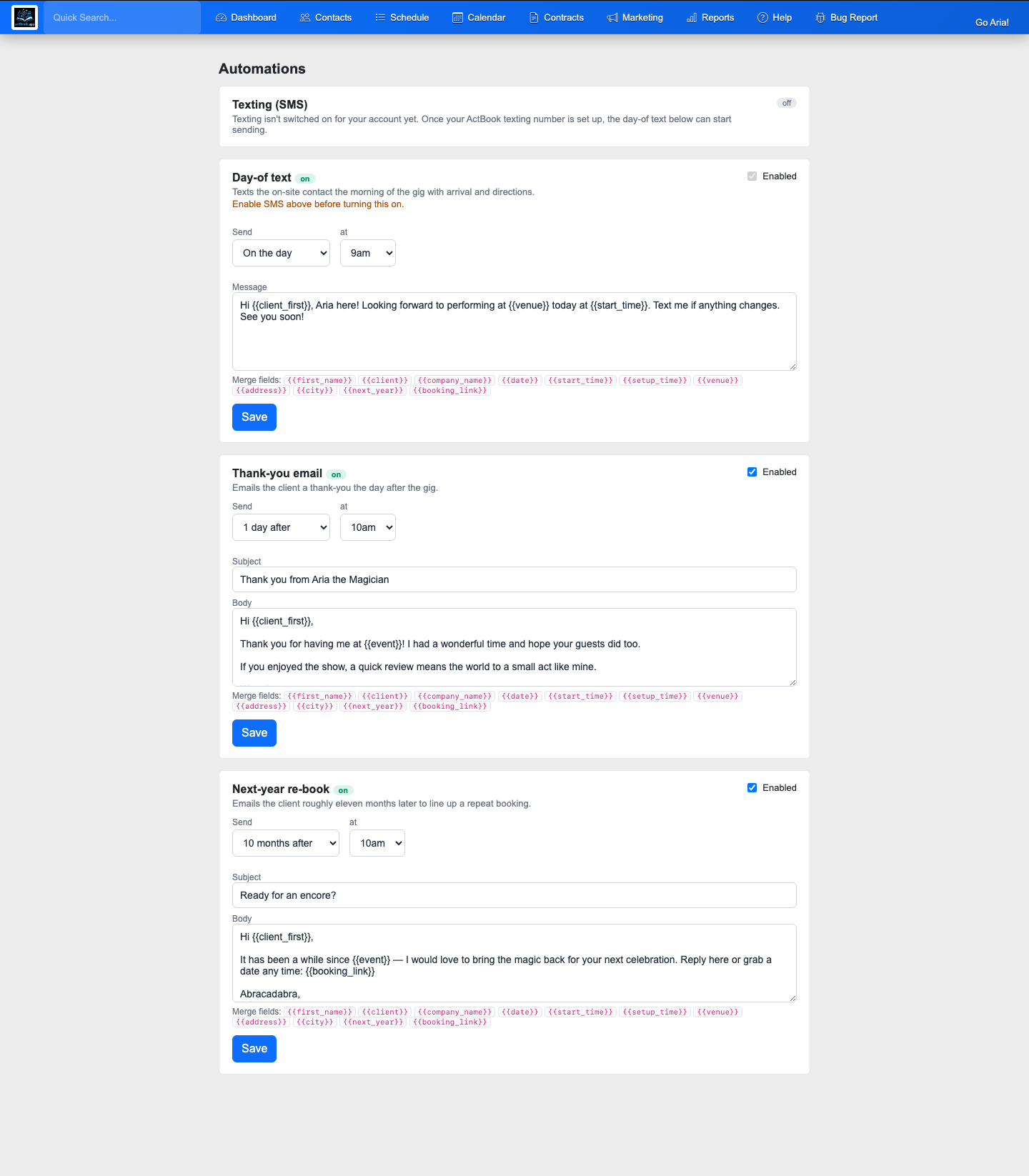
The morning of the gig, ActBook texts your client the arrival time and directions. A day later it emails a thank-you. And about a year on, it quietly nudges them to book you again — booking link right there in the message. One-off gigs turn into annual traditions.

  • Day-of text with arrival time & directions
  • Automatic thank-you the day after
  • A "shall we do it again?" nudge about a year later
actbook.app/automations
The automations screen: day-of text, thank-you email, and re-book nudge

8 Marketing & email drip

The quiet machine that fills your slow weeks.

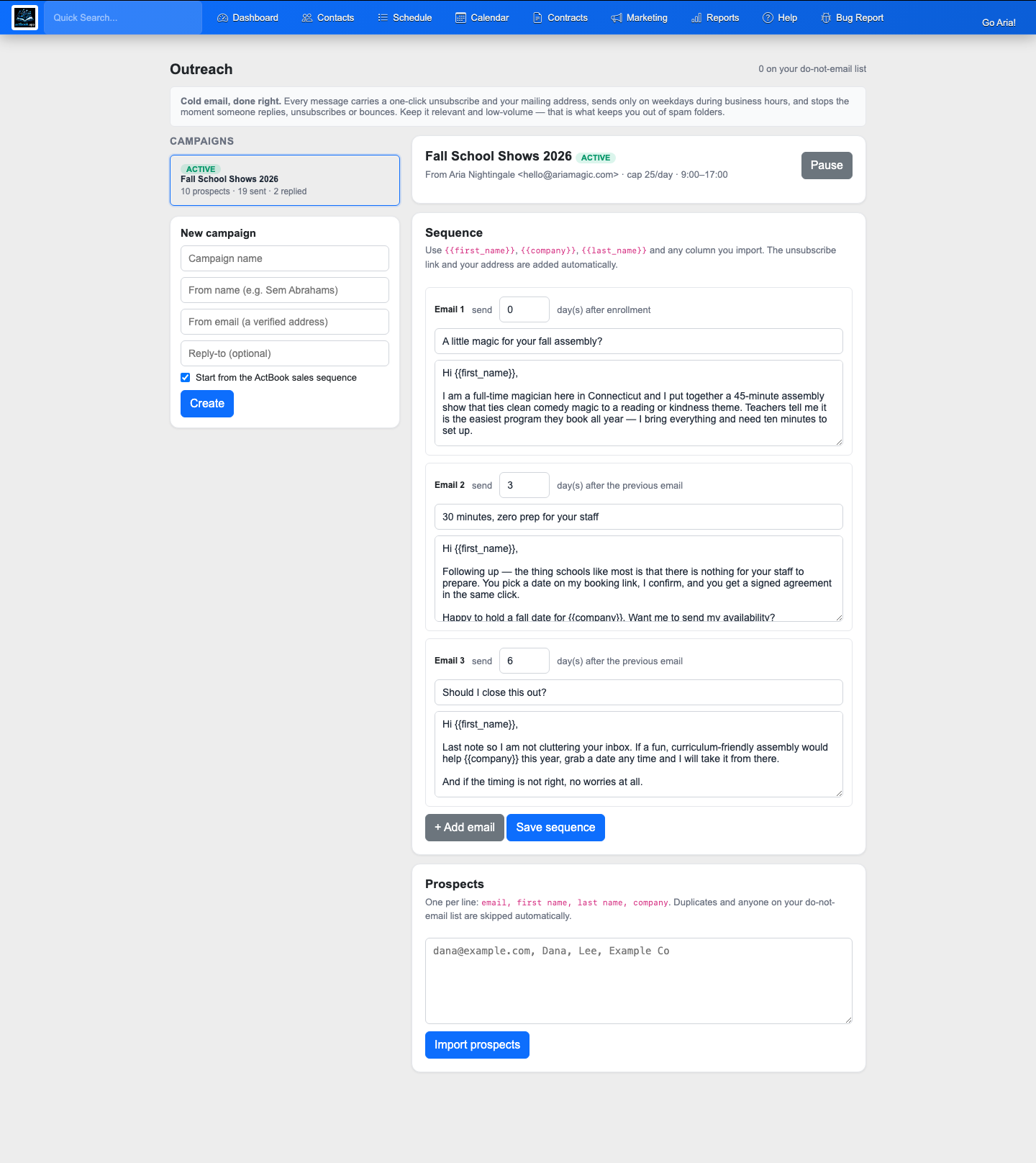
Build a prospect list and let ActBook work it for you. A multi-step email sequence goes out on your schedule — first touch, then a nudge a few days later, then one more — and anyone who replies or opts out drops off automatically. Want to reach the clients you already have? Blast your whole list about a new show in a couple of clicks.

  • Multi-step drip sequences with a follow-up cadence you set
  • Auto-stops the moment a prospect replies or unsubscribes
  • Daily send caps and send-hour windows keep it human
  • Mass-email past clients about new shows and open dates
actbook.app/outreach
An email drip campaign with a multi-step follow-up sequence

9 Reports

See what you earned, and how far you drove.

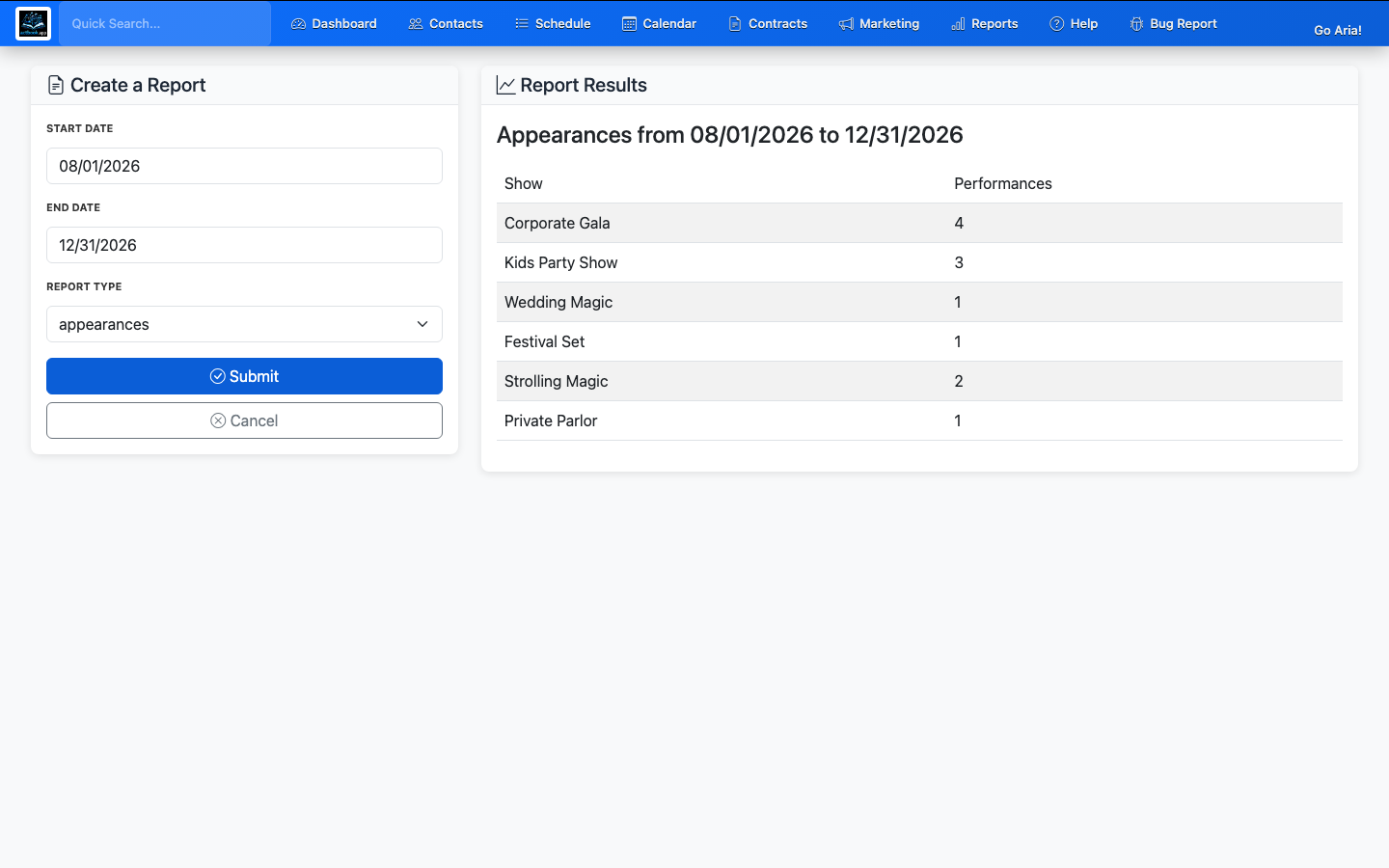
Income and appearance reports over any date range, plus mileage totals for tax time. Know your best months, your busiest venues, and exactly what the year looked like — without building a single spreadsheet.

  • Income and appearances over any date range
  • Mileage detail for tax season
  • Printable crew and day-end sheets
actbook.app/reports
Reports: income, appearances, and mileage over a date range

10 AI & API

Or skip the clicking — just tell it what to do.

Every stop on this tour is also available over an open API — and an AI assistant can drive it for you. Ask it to check your availability, price a package, send a contract, raise an invoice, or text a client, and it does the work. The whole loop you just walked through, run from a conversation on your phone.

  • Bring your own AI, or use ours — anything that speaks MCP connects
  • Scoped keys (read / write / money / comms) so it only does what you allow
  • Every action is logged, and texts or blasts can be previewed before they send
  • An add-on on any plan, from Act to Agency
“Anyone want us for a fair the third weekend of June?”
You’re open Sat Jun 20. Sunday you’re booked in Toledo — too far to add a Detroit gig that day. Hold the 20th?
“Hold it. Send the school our Circus Day package with a 25% deposit link.”
Done — date held, quote sent with the contract attached and a $625 deposit link. I’ll text you the moment they pay.

See how the API & AI works →

And it lives in your pocket.

ActBook runs right in your phone — no separate app to keep updated, nothing to sync.

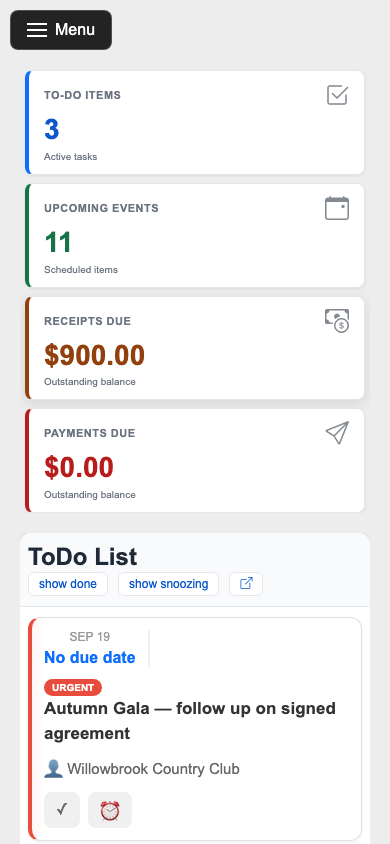
ActBook's dashboard on a phone, with stacked stat cards and a to-do list

📱 Add it to your home screen

ActBook installs like an app on your phone. Check tomorrow's gig, confirm a request, or send a contract from the wings — no laptop required. It's the same booking system, just in your hand.

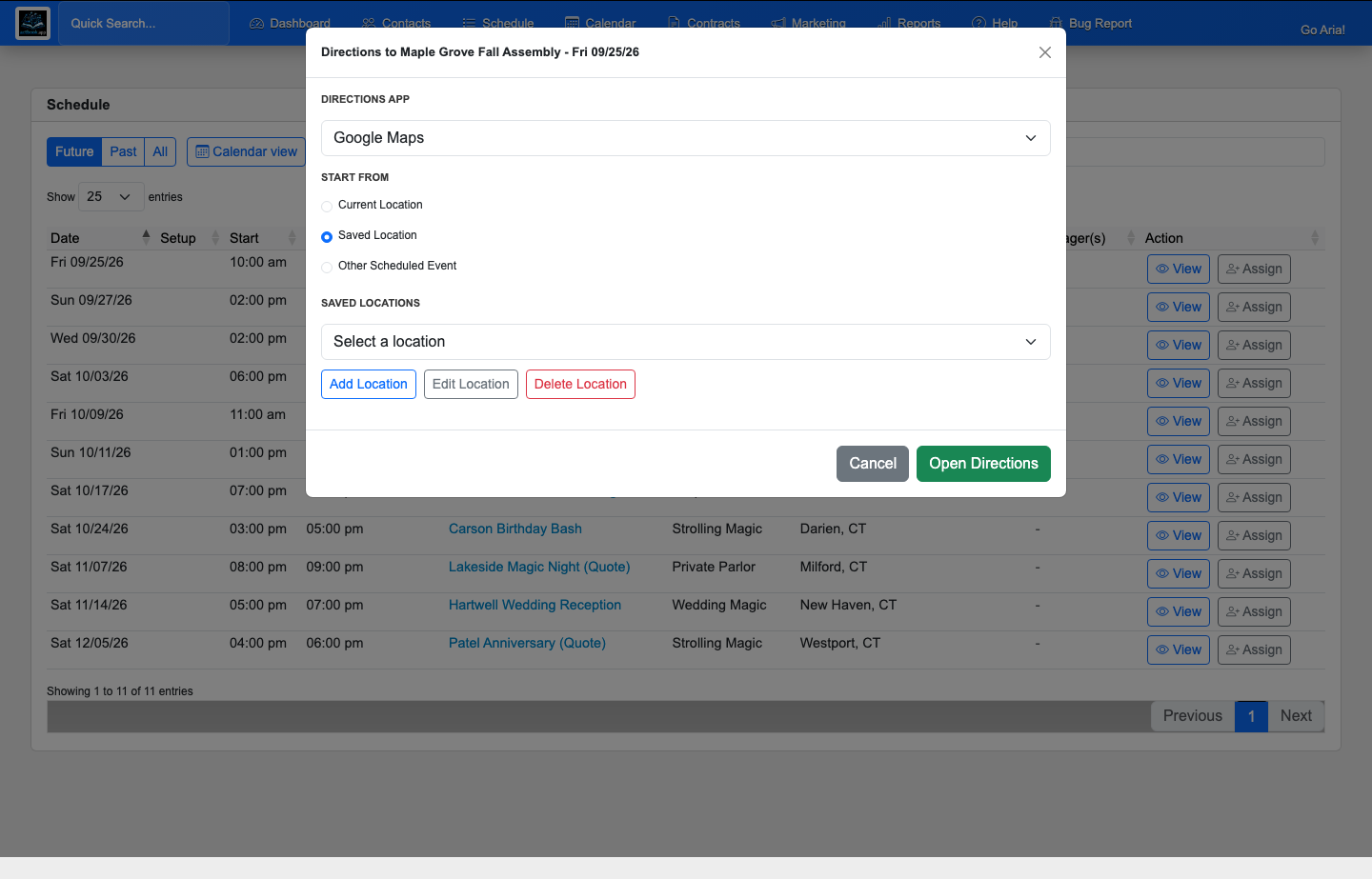
One-tap driving directions to a gig venue, choosing Google, Apple, or Waze

📍 One tap to the venue

On gig day, every booking has driving directions straight to the venue address. Pick Google, Apple, or Waze, tap once, and your maps app takes over — no copying zip codes at a red light, no "wait, which entrance?" five minutes before doors.

Teresa and Sem Abrahams performing their Semcycle unicycle act

Every stop on this tour exists because we needed it ourselves. We're Teresa & Sem Abrahams — we've booked our own live shows since 1986, and ActBook still runs our company today. Read why we built it →

That's the whole loop.

Set it up once and let your act book itself. 14 days free, no credit card required.

Create Your Account →

By signing up you agree to our Terms and Privacy Policy.